Okay i know of FEBE that is used to backup your Firefox profiles. But why install another extension to that already long list of installed extensions.
So here you go. Everyone knows about the Profile folder right? No? Alright well lets do this.
NOTE: You must CLOSE out Firefox before doing this. So if you are unsure of how to do this open this topic in another Browser to see the steps.
Windows XP:
Windows Vista:
Now here is the fun stuff. You see some abstract folder in here. It has some strange name. With a weird alpha numeric combination before your see .default at the end.
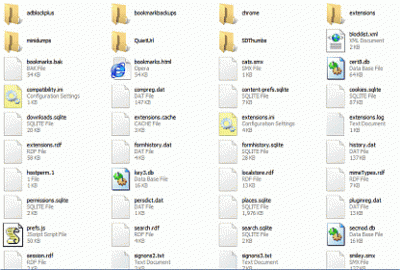
Now go into this folder. You will see a bunch of stuff. See attached image.
Now here is the fun stuff. Using WinZip or WinRar select all the files in the folder. Ctrl+A does well. Now right click and select the option to add to archive. Give it a name and save it to your PC or back it up somewhere.
Now when you reinstall Firefox COPY this archive to the Firefox profile folder again.
*NOTE* You must run Firefox at least once to get the profile folder setup for this to work right
Now that you got the profile folder and your archive there unzip it or unrar it. OVERWRITE the files. Now you can delete the rar or zip file. Since you only copied it to the folder.
Now run Firefox. You will be prompted to Restore your session or start a new one since the Profile has changed. Start a new one. You will see all your extensions, bookmarks and everything are exactly as they were the last time you backed up your profile.
If you use Personas like myself and Trotter even that will be active again.
Enjoy.
So here you go. Everyone knows about the Profile folder right? No? Alright well lets do this.
NOTE: You must CLOSE out Firefox before doing this. So if you are unsure of how to do this open this topic in another Browser to see the steps.
Windows XP:
- Open My Computer. Go under Tools>Folder Options>View Tab. Click to show hidden files.
- Now go under your C:\Documents & Settings folder. (The C:\ drive mentioned is the drive where you have Windows installed. It might not be C:\ on your specific system) Go into your username folder. There you will see Application Data folder. Go in there.
- Now go into the Mozilla Folder. There you will see the Firefox folder. Now go into the Profile folder.
Windows Vista:
- Open Computer. On the left side you will see a button that says Organize. Click that and Select Folder Options.
- Click on the View Tab and check the setting for show hidden files and folders. Click Okay to save the settings.
- Now in Computer Go under User>App Data>{UserName}>Roaming>Mozilla>Firefox>Profile. This is where the profiels are kept.
Now here is the fun stuff. You see some abstract folder in here. It has some strange name. With a weird alpha numeric combination before your see .default at the end.
Now go into this folder. You will see a bunch of stuff. See attached image.
Now here is the fun stuff. Using WinZip or WinRar select all the files in the folder. Ctrl+A does well. Now right click and select the option to add to archive. Give it a name and save it to your PC or back it up somewhere.
Now when you reinstall Firefox COPY this archive to the Firefox profile folder again.
*NOTE* You must run Firefox at least once to get the profile folder setup for this to work right
Now that you got the profile folder and your archive there unzip it or unrar it. OVERWRITE the files. Now you can delete the rar or zip file. Since you only copied it to the folder.
Now run Firefox. You will be prompted to Restore your session or start a new one since the Profile has changed. Start a new one. You will see all your extensions, bookmarks and everything are exactly as they were the last time you backed up your profile.
If you use Personas like myself and Trotter even that will be active again.
Enjoy.