|  | |
11-21-2008, 03:29 PM
|
#1 (permalink)
|
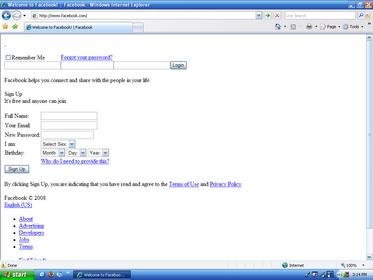
True Techie Join Date: Jan 2004 Posts: 241 | Facebook CSS Problems?... Maybe? I'm working on a friend's computer who is having trouble viewing facebook. Everything on facebook is displaying as a white background with plain text. I've attached a screenshot of it in IE7, but it does exactly the same thing in Firefox as well.
Any ideas what might be causing this? So far as I can tell, all other sites are fine. |
| |
11-21-2008, 10:09 PM
|
#2 (permalink)
|
Join Date: Sep 2004 Location: The Source Posts: 22,602 | Re: Facebook CSS Problems?... Maybe? The site is not fully loading. Run CCleaner to clear teh browser cache for IE and firefox. |
| |
11-22-2008, 02:24 AM
|
#3 (permalink)
|
Wizard Techie Join Date: Feb 2006 Location: Maine Posts: 3,642 | Re: Facebook CSS Problems?... Maybe? The CSS is not loading. In Firefox, go to View>Page Style> make sure it's on Basic Page Style. Not sure how to do this in IE.
Also try what Mak said.
__________________ Need website help? PM me! |
| |
11-22-2008, 04:00 PM
|
#4 (permalink)
|
True Techie Join Date: Jan 2004 Posts: 241 | Re: Facebook CSS Problems?... Maybe? I removed everything that CCleaner found and also the Page Style was already set corrrectly, but still no luck.
Here's a shot of the firefox error log: http://i17.photobucket.com/albums/b6...6/FFErrLog.png |
| |
11-22-2008, 04:33 PM
|
#5 (permalink)
|
Join Date: Sep 2004 Location: The Source Posts: 22,602 | Re: Facebook CSS Problems?... Maybe? It would have to do either with your router or a plugin you are using. |
| |
11-22-2008, 04:53 PM
|
#6 (permalink)
|
True Techie Join Date: Jan 2004 Posts: 241 | Re: Facebook CSS Problems?... Maybe? It can't be the router because it does this both with their router and mine, plus all of my computers work fine.
Also, I have disabled all Firefox plugins and stared IE without addons and get the same result. Considering both IE and FF do the exact same thing, doesn't this look like more of a system-wide problem, rather than just the browser?
I have no idea because I've never seen this before. |
| |
11-22-2008, 08:01 PM
|
#7 (permalink)
|
Join Date: Sep 2004 Location: The Source Posts: 22,602 | Re: Facebook CSS Problems?... Maybe? Facebook loads up just fine for me with Firefox, Opera in Ubuntu, Kubuntu, Vista, XP and Windows 7. So i know it isnt the site or the browser you are using. So it has to be something with your setup. The reason i said router is because one of the errors pointed to the address 127.0.0.1 which is your router address.
Try hooking the PC right up to the modem.
If i can get it working on 2 different PC's with several different OS's and browsers. There has to be something on your end blocking it. |
| |
11-22-2008, 08:49 PM
|
#8 (permalink)
|
True Techie Join Date: Jan 2004 Posts: 241 | Re: Facebook CSS Problems?... Maybe? I know it's something on this end. It's obviously something within this particular PC. Like I said, my other PC's behind the same router work fine. That 127.0.0.1 error caught my attention as well, but I don't know what it means. Isn't that referencing the PC's own loopback? I know my router's address is 192.168.1.1.
I wasn't aware that browsers should ever be trying to connect to the loopback unless maybe you were running a local proxy/filter of some kind, which I'm not. I've also double checked that all proxy settings are clear. |
| |
11-22-2008, 09:01 PM
|
#9 (permalink)
|
Join Date: Sep 2004 Location: The Source Posts: 22,602 | Re: Facebook CSS Problems?... Maybe? Again did you try it with just the modem? Have you tried to hard reset the router? |
| |
11-22-2008, 09:14 PM
|
#10 (permalink)
|
True Techie Join Date: Jan 2004 Posts: 241 | Re: Facebook CSS Problems?... Maybe? No, I have not tried that yet. The reason being I have 7 other computers on the network, all of which are working perfectly and I haven't had an opportunity to disconnect them all with a router reboot. Also, considering that we're having this problem both at my friend's own house, as well as at my workshop, the chance of both routers having the same problem is pretty slim. I'll try a reboot and bypass the router as soon as I can. |
| |  | | | Thread Tools | | | | Display Modes | Linear Mode |
Posting Rules
| You may not post new threads You may not post replies You may not post attachments You may not edit your posts HTML code is Off | | | | |